Smart lighting automation means your lights turn on and off by themselves: at sunset, when someone walks in, or when the last person leaves home. Done well, it removes the most common lighting waste of all, which is lights left on in empty rooms.
- Smart lighting automation saves energy only where lights are often left on in empty rooms.
- The best spots are garages, closets, laundry rooms, hallways, and outdoor lights.
- Motion sensors use a small amount of standby power, about a watt, so they pay off only on lights that are often forgotten.
- Below you’ll find a waste calculator and five ready-to-copy routines for Alexa and Google Home.
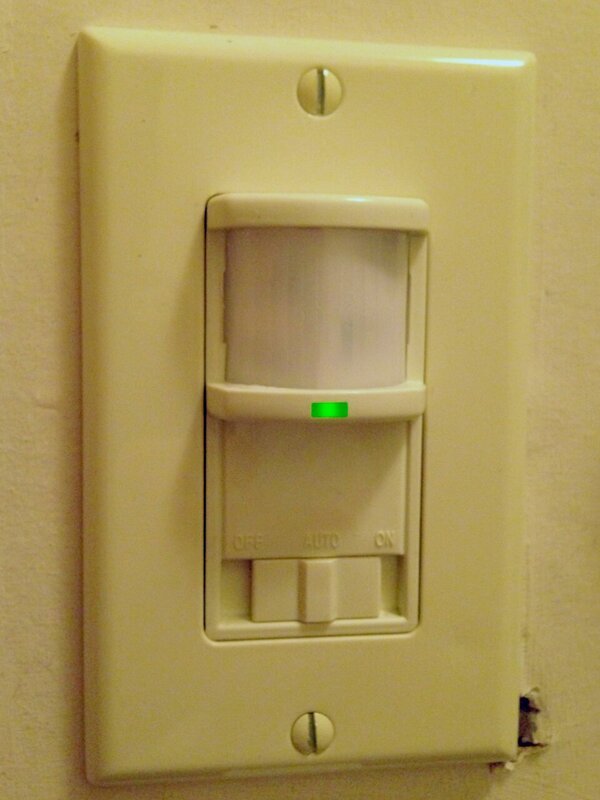
But automation is not magic. In a busy living room, a motion sensor can switch the lights off while you sit still. Start with the calculator, then copy the routines that fit your home.
How Much Do Forgotten Lights Cost You?
We subtract about 1 watt of standby use for the sensor, all day, all year.
Where Smart Lighting Automation Works Best
| Room | Best automation | Why |
|---|---|---|
| Garage, closet, laundry | Motion on, auto-off after 2–5 minutes | Short visits, lights often forgotten |
| Hallway and stairs | Motion at night, dim level | Safety without waking everyone |
| Outdoor lights | Sunset to a fixed time, or motion | Stops lights burning all night |
| Kids' rooms and bathrooms | Vacancy sensor (turns off only) | You switch on; it switches off |
| Living room, office | Schedules or "away" routine, not motion | Motion sensors miss people sitting still |
Five Smart Lighting Automation Routines to Copy
These work in the Alexa app (More → Routines) and the Google Home app (Automations). Names may vary slightly.
- Sunset porch light. When: sunset. Action: porch light on. Then: off at 11 p.m.
- Everyone left. When: the last person leaves home (location). Action: all lights off.
- Garage motion. When: motion sensor detects motion. Action: garage light on. Then: off after 5 minutes with no motion.
- Night hallway. When: motion between 11 p.m. and 6 a.m. Action: hallway light at 10% brightness for 2 minutes.
- Good night. When you say "good night": all lights off except the bedroom lamp, which dims over 10 minutes.
Watch: Occupancy vs. Vacancy Sensors
This short video from Lutron, a switch maker, explains the difference. An occupancy sensor turns lights on and off. A vacancy sensor only turns them off, which is often better for bedrooms and bathrooms.
What Real Owners Say
These are individual experiences, summarized in our own words.
On the Garage Journal forum, one member said motion sensors saved him a lot on electricity, because nobody else in the house ever bothered to switch lights off. Another member in the same thread said motion lights frustrated him so much that he didn't want any more of them.
Source: Garage Journal forumA home blogger replaced a timer switch in a busy garage with a Lutron motion sensor switch. It keeps the lights on while it senses movement and turns them off after 1, 5, 15 or 30 minutes without motion. It works with the mix of CFL and LED bulbs they already had.
Source: Charles & HudsonWhen Automation Won't Save You Much
- You already switch lights off. There is little waste left to remove.
- Rooms where people sit still. Lights turn off on you, and people disable the sensor.
- Very low-wattage LEDs used briefly. The sensor's own standby use can match the saving.
- Where lights are most often left on, by room
- Standby power of sensors and the wattage of common bulbs
- Routines that work in Alexa and Google Home without extra hubs
- Real owners’ experiences, good and bad
We haven’t tested these products in person. No brand paid to be included.
Frequently Asked Questions
What is smart lighting automation?
It means lights turn on or off by themselves based on time, motion, sunlight or your location, instead of a switch.
Motion sensor or vacancy sensor?
A vacancy sensor only turns lights off. It avoids lights switching on when you don't want them, and many people prefer it in bedrooms and bathrooms.
Do I need a hub?
Not always. Many Wi-Fi and Matter devices work directly with Alexa or Google Home. Zigbee sensors may need a hub.
Our Verdict
Smart lighting automation is worth it in the garage, closets, laundry room, hallways, and outdoors. Start with one motion sensor and the "everyone left" routine. Those two cover most of the waste in a typical home.
Skip motion sensors in living rooms and offices. Use schedules there instead.
Keep reading
- Smart Light Bulbs vs Smart Switches: Which Should You Buy?: smart bulbs or smart switches.
- Best Solar Lights for Your Yard: What Lasts and What Doesn't: outdoor solar lights that last.